syntax highlight

Thursday, 29 November 2012

Cool C++0X features XIII: auto and ranged for, cleaner loops FTW

Long time without updating this series. Last time we saw how the ugly

for (FooContainer::const_iterator i = foobar.begin(); i != foobar.end(); ++i)

could be transformed into the much cleaner

for (auto i = foobar.begin(); i != foobar.end(); ++i)

Yet we are not done, we can clean that a lot more using for range statements.

Ranged for is basically syntactic sugar (no flamewar intended) for shorter for statements. It's nothing new and it's been part of many languages for many years already, so there will be no lores about the greatness of C++ innovations (flamewar intended), but it still is a nice improvement to have, considering how tedious can be to write nested loops. This certainly looks much cleaner:

for (auto x : foobar)

This last for-statement, even though it looks good enough to print and hang in a wall, raises a lot of questions. What's the type of x? What if I want to change its value? Let's try to answer that.

The type of the iterator will be the same as the type of the vector, so in this case x would be an int:

std::vector foobar;
for (auto x : foobar) {
	std::cout << (x+2);
}

And now, what happens if you want to alter the contents of a list and not only display them? That's easy too, just declare x as an auto reference:

std::vector foobar;
for (auto& x : foobar) {
	std::cout << (x+2);
}

This looks really nice but it won't really do anything, for two different reasons:

  • Ranged fors won't work until g++ 4.5.6 is released
  • The list is empty!

There are many ways to initialize that list, but we'll see how C++0X let's you do it in a new way the next time.

Tuesday, 27 November 2012

Hugging borked on Ubuntu?

Hugging is pretty awesome to create panoramic photos. I use it regularly, for example for this awesome Prague old town square panoramic I took some time ago:

[BROKENIMAGE]

At some point I realized that, after an upgrade, Hugging just stopped finding connection points. Apparently there's a licences issue somewhere. Just "sudo apt-get install autopano-sift" and continue hugging.

Thursday, 22 November 2012

Vim tip: goto column

You can quickly jump to a specified column in Vim by simply typing the column number followed by a pipe, like this:

80| # go to the 80th column

Tuesday, 20 November 2012

False sharing in multi threaded applications, part II

In the last entry we learned how an apparently parallel algorithm can turn into a sequential nightmare via false sharing; what you may think to be two independent variables may actually be spatially close, thus sharing a cache line which gets invalidated by each and every write across cores. But is this a real world issue? If so, how can we fix it?

We'll work backwards: let's see first how can this be fixed, and then we'll check if this is actually a real world issue.

Remember our code sample, from last time:

void lots_of_sums(unsigned idx, int v[])
{
	const unsigned itrs = 2000*1000*1000;

	for (int i=0; i < itrs; ++i)
		v[idx].num = i;
}

An easy way to avoid false sharing would be to just assign i to a temporary variable, then assign the real result to v[i]; this way, you would be writing only once, the intermediate results will be in TSS, thus avoiding the contention in the loop.

The second strategy to solve this problem would be to use padding. Knowing that your cache line is made of 64 bytes will let you write something like this:

struct Padded {
	int num;
	char pad[60];
};

Of course, this has another problem: what about the offset? We need not only padding but also spacing, for the alignment.

struct Padded {
	char space[60];
	int num;
	char pad[60];
};

Alternatively, you could use the align keyword of C++0x, but since it's not implemented on g++ I have never tested it before, so I have no idea how it's supposed to work. For more information on this you can check Herb Sutter's article, Eliminate False Sharing.

Monday, 19 November 2012

False sharing in multi threaded applications

Concurrent programing is hard. Very hard. But every once in a while you can actually find a textbook problem, an application for which a parallel algorithm is not only simple but also intuitive, so clear that it would be difficult to actually do it any other way. You put on your high speed helmet and fasten your seatbelt, ready for an FTL (faster than lineal) jump.

Running make && make test only show lower numbers. You actually decreased the performance of your application, by making it multi-threaded! How can this be possible?

While writing concurrent algorithms there are many places where you can fail, miserably. Contention is only one of them, but this is a very subtle way of failure; it will render your concurrent algorithms into a very complicated sequential algorithm, run in many cores. How can a simple concurrent algorithm turn into such a mess?

In many cases, false sharing is the culprit of the lost performance. How exactly? Let's write a simple example for this:

void lots_of_sums(unsigned idx, int v[])
{
	const unsigned itrs = LOTS;

	for (int i=0; i < itrs; ++i)
		v[idx].num = i;
}

Imagine this function, one running in each core and v defined as a simple array. We can expect this to have a linear scalability, right? Turns out it's not that simple. Why? Let's see how v is laid out in memory:

+------------+--+--+--+------+-----------------+
|Random stuff|V0|V1|V2|...|VN|More random stuff|
+------------+--+--+--+------+-----------------+

So, v will (most likely) be made of adjacent chunks in memory. We can also assume that sizeof(v[i]) will be 4 or 8 bytes, or something small like that. Why is that important?

Remember that nowadays a CPU core is amazingly fast, so much that they make main memory look like dial up. To avoid waiting for the main memory to complete a request, several levels of cache exists. These caches know nothing about your application (well, mostly) so they can't know that v0 and v1 are actually different variables. Notice how this would apply if instead of a vector they were two random variables which happen to be allocated spatially close.

If the CPU cache, L1 for the friends, can't know that v0 and v1 are separate, it will probably try to cache a whole chunk of memory. Say, maybe 64 or 128 bytes. Why should you care?

Let's go back to our code. When you see this

...
	v[idx].num = i;
...

you just see independent accesses to different variables. What will the cache see? Let's go back to our memory layout, but this time let's make up an offset too:

0xF00    0xF10  0xF14...                   0xF40
+------------+--+--+--+------+-----------------+
|Random stuff|V0|V1|V2|...|VN|More random stuff|
+------------+--+--+--+------+-----------------+

So, if we assume a 64 byte cache line, then how might the CPU see a read-write process for v[0]? Something like this, probably:

 +---------+-------------------+----------------------------+---------------------------+
 |  C Code |       CPU         |             L1             |        Main Memory        |
 |---------|-------------------|----------------------------|---------------------------|
 |         |                   |                            |                           |
 |Read v[0]|                   |                            |                           |
 | +------+|                   |                            |                           |
 |       +-> Hey, get me 0xF10 |                            |                           |
 |         | +----------------+|                            |                           |
 |         |                  +> Huh... I don't have 0xF10, |                           |
 |         |                   | let me get that for you... |                           |
 |         |                   |  +-----------------------+ |                           |
 |         |                   |                          +-> 0xF00... yup, here you go |
 |         |                   |                            |                           |
 |         |                   |  I have it now!            |                           |
 +---------+-------------------+----------------------------+---------------------------+

Note an important bit there: the CPU requested 0xF10 but L1 cached the whole segment, from 0xF00 to 0xF40. Why is that? It's called spatial locality or locality of reference and since it's not the main goal of this article I'll just say that L1 will cache the whole segment just in case you want it.

So far so good. What happens when you add more CPUs and write OPs? Remember that write OPs are cached as well.

Looks pretty similar, but note an interesting thing: CPU1 will read v[0], which translates to 0xF10, whereas CPU2 will read v[1], which translates to 0xF14. Even though these are different addresses, they both correspond to 0xF00 segment, thus L1 will have actually read the same chunk of memory!

The problem with this starts when a thread needs to write. Like this:

Wow, a simple read from L1 cache now fails because it's been marked as dirty by an L1 from another CPU. How crazy is that? (*)

Can you see now why our simple and elegant parallel algorithm has turned into a messy lineal... steaming pile of code? Each time a core tries to write to his own variable, it's inadvertently invalidating the variables other cores need. This is called false sharing, and we'll see a fix next time.

(*) Disclaimer: this diagram, and the ones before, are simplifications of what actually happens. In reality there are several levels of cache, and some of those may be shared between cores, so most likely the L1 won't need to go to main memory. Also, even in the case where there is no shared cache between cores, there are cache coherency protocols which will most likely avoid a read from main memory.

Tuesday, 13 November 2012

Easy bind dns log analyzer

Any real-programmer (tm) should be able to memorize all the static IPs in his network and should feel more comfortable using the IP to access the LAN resources, instead of those user friendly URL things. Of course, not everyone is a real-programmer (tm), and these people usually drive crazy the poor guys who do remember all the static IPs in the office. For them, the DNS was invented.

Some time ago I set up a bind9 on a spare server I had. Easy job, a side project of a boring late night. Of course, there was no point in just setting up my own TLD; I now had the power to have fun with DNS poisoning, and I could also create nice reports of the queries to the DNS server.

Having fun with a DNS might be the topic for another post, for this one I'll just focus on how to get query statistics from a bind server.

After grepping the web a little bit, I found a rather disconcerting lack of bind log analyzers. I just wanted a list of the most popular queries, as well as the ability to group the log by it's IP (and may be even to get the computer's SMB name). Couldn't have asked for a better chance to flex a little bit my Ruby-foo, and here is the hackish result for whoever may want to do something similar: [source lang="ruby"]#!/usr/bin/ruby1.8 class Hits def initialize(n,v,k=nil) @n=n @v=v @k=k end def n() @n; end def v() @v; end def k() @k; end def <(o) @n < o.n; end end if ARGV.length == 0 then puts "Usage: dns.rb DNS_LOG [--domains] [--ip [--no-samba]]" puts " --domains will list all queried domains" puts " --ip will list every query gruoped by IP" exit end @domains = @ip = @nosamba = false ARGV.each { |arg| case arg when '--domains' then @domains = true when '--ip' then @ip = true when '--no-samba' then @nosamba = true end } fp = File.open ARGV[0] queries_by_ip = {} queries_by_domain = {} fp.each_line { |l| v = l.split(' ') if not (v.nil? or v.length < 4) then ip = v[1].split('#')[0] query = v[3] if queries_by_domain[query].nil? then queries_by_domain[query] = 0 end queries_by_domain[query] += 1 if queries_by_ip[ip].nil? then queries_by_ip[ip] = [] end queries_by_ip[ip].push query end } if @domains then hits = [] queries_by_domain.each { |k,v| hits.push Hits.new(v, k) } hits.sort!.reverse!.each { |h| puts h.v + " has " + h.n.to_s + " hits" } end if @ip then lst = [] queries_by_ip.each { |ip,queries| lst.push Hits.new(queries.length, ip, queries) } lst.sort!.reverse!.each { |h| puts "Report for " + h.v + ", Samba addr:" if not @nosamba then Kernel.system "nmblookup -A " + h.v end puts "Requested " + h.n.to_s + " URLs:" h.k.uniq.each { |url| puts "t" + url } puts "." puts "." } end

Tuesday, 6 November 2012

Redirecting connections from one port to another with iptables

People say iptables are incredibly useful. Mind you, I have gotten mostly headaches out of it, but it is easy to see they are a powerful tool. The other day (for reasons not relevant to this post) I needed to run a service on a port, yet have it accept connections in a different port. Say, the service should be listening on port 1234, but the server should accept any connection on port 4321 and "redirect" each package to the correct port. Turns out iptables is the tool for the job.

For the impatient ones, this is the command I used:

iptables -t nat -A PREROUTING -s 192.168.10.0/24 \
         -p tcp --dport 4321 -j DNAT --to :1234

Let's analyze this part by part. First I tried something like this:

# Caution: This is wrong and won't work!
iptables -A INPUT -s 192.168.1.0/24 --dport 4321 --to :1234

Seems clear enough:

  • -A INPUT will add this rule to the INPUT chain (i.e. the list of rules that are run for every incoming packet.
  • -s 192.168.1.0/24 will filter the packages, so this rule will only be applied to the packets incoming from the 192.168.1.0/24 network.
  • --dport 4321 will filter the packages again, so we can apply this rule not only to those packets incoming from the LAN but also to those packet to port 4321.
  • --to :1234 is the rule to rewrite the destination port.

Too bad this won't work. To begin with, the --dport option will fail, since it makes no sense to talk about ports without specifying a protocol (i.e. ports are a TCP layer concept, not an IP layer conecpt, so iptables doesn't know what to do with a --dport option!). Thus, let's rewrite our command like this:

# Caution: This is wrong and won't work!
iptables -A INPUT -s 192.168.1.0/24 -p tcp --dport 4321 --to :1234

Now iptables will complain about the --to option. This is because iptables can't rewrite a package (i.e. use the --to option) unless you specify to jump to the DNAT table (?). Now our command should look like this:

# Caution: This is wrong and won't work!
iptables -A INPUT -s 192.168.1.0/24 -p tcp --dport 4321 -j DNAT --to :1234

iptables will still complain: you can't use DNAT unless you use a nat table, so we have to add -t nat. If we do that, iptables will complain once more about not being able to use DNAT in the INPUT chain, it is only available in the PREROUTING/OUTPUT chains. This is related to the order in which iptables processes its rules.

With all this in mind, we can now write a command that will run:

iptables -t nat -A PREROUTING -s 192.168.10.0/24
         -p tcp --dport 4321 -j DNAT --to :1234

Thursday, 1 November 2012

stlfilt: read ugly tmpl errors

There's nothing better for Monday mornings than the smell of hundreds of template errors after a make clean all. When using template metaprogramming, a tiny misplaced coma can generate enough error code that, if printed, would crush you under tones of paper. And don't even try to read them, it'll make your head explode.

Luckily STLFilt can be quite a relief when dealing with this kind of errors. Granted, it won't make a steaming pile of poo seem to be a nice poem, but if you have something like the dog in the picture, to use a metaphor, at least it would put a blanket on its face.

Tuesday, 30 October 2012

Fastgrep, a cache for grep

Sooner or later, you'll find that you need to know where to find a certain piece of text that ctags does not index, and grep is just not fast enough. Say, you're trying to match that log line you see every one in a while to the specific printf("I'm here!\n") that produced it.

Working on any reasonable sized project, searching for free-form text means you'll need some kind of indexing; grep will work, but you'll end up having to wait a couple of minutes between searches. Funny thing, we can probably speed up grep quite easily. Long story short, you can find a grep cache here: Fastgrep.

So, how does it work? If we reason a bit about how grep will spend time we can probably assume the following:

  1. Re-positioning the disk head to find the next file to grep
  2. Reading file contents
  3. Opening & closing files
  4. Actually grepping

I didn't actually check how closely this "benchmark" resembles reality, but it seems reasonable to assume that most of the time grep spends searching for a string in a big project, is actually wasted in I/O, and more cores won't help.

After a quick Google search I didn't come up with any already available grep cache, so I rolled up a quick version myself which you can find here: Fastgrep. The idea behind it is very simple, if most of the time is wasted accessing files, then just cat every file in the project together and grep that one instead.

Since the grepcache is actually a merged copy of all the files in the project, it can quickly get out of sync with the rest of the code. To somewhat improve this the index file is only used to get the list of files where a string might be found; these files are then grepped for the real results. This only helps a little bit and eventually everything gets out of sync, but I found that rebuilding the cache in a post-merge git hook (or a post-commit svn hook) is more than enough to make fastgrep more than usable.

Thursday, 25 October 2012

Fixing keyboard layouts in Ubuntu. Scarier than it seems.

At the moment of writing this post there is an open bug in Ubuntu, still active in 11.04, that makes your keyboard layout revert to whatever GDM wants. Apparently this is caused by GDM failing to synch with the preferences of the session, so if you change your layout (even if you delete the previous one) the change will be reverted next time you login. There seems to be no fix coming soon, so this magic incantation might work if you have this problem:

sudo dpkg-reconfigure keyboard-configuration

This will ask you a lot of questions about your keyboard, good luck guessing. It kind of reminds me the Windows 95 install process, in which erring the keyboard layout meant it was probably easier to just format and reinstall everything all over again. With some luck, next time you reboot your Ubuntu will actually remember your keyboard preference. If not, just take this as an opportunity to learn a foreign language.

Having keyboard problems? You may also be interested in learning how to activate tildes and accents for a USA keyboard layout in Ubuntu.

Tuesday, 23 October 2012

Getting a stacktrace on C/C++: Mapping function pointers to function names on runtime

Last time we talked about mapping function addresses to names (albeit mangled) in object files; we can also get this information during runtime:

Glibc to the aid

Let's go one step back: how to get the current stacktrace. Turns out glibc already has a nice feature to get the current stacktrace. Going back to our original program, with some minor changes:

struct Caller { Caller *addr; };
void bt_by_hand() {
    // Get the stack base ptr from a register
    void *sp;
    asm("movl %%ebp,%0" : "=r"(sp));

    // Loop through every caller
    cout << "Hand made stack walker" << endl;
    Caller *caller = (Caller*)sp;
    while (caller) {
        cout << (((void**)caller)[1]) << endl;
        caller = caller->addr;
    }
}

#include <execinfo.h>
void bt_glibc() {
    void* buffer[10];
    int frames = backtrace(buffer, sizeof buffer);

    cout << "glibc stack walker" << endl;
    for (int i=0; i < frames; ++i) cout << buffer[i] << endl;
}

void bar(int, float) {
    bt_by_hand();
    bt_glibc();
}

Clearly using glibc's version is much cleaner, but will they yield the same results? Turns out not:

Hand made stack walker
0x80487b0
0x80487d5
0xb7659113
glibc stack walker
0x804873b
0x80487b5
0x80487d5
0xb7659113
0x8048611

Similar, but not quite.

  • The first address in the glibc's stack walker correspond to the bt_glibc, and more importantly since the real glibc backtrace is a function call itself it's easy to get that function into the stack. We don't even consider that case on our hand made stack walker. First difference explained.
  • The second address should correspond to bar, but one is 0x80487b0 and the other is 0x80487b5. Again, it makes sense: since the void* is actually the return address for EIP if we check the dissasembly we'll find that the 5 bytes difference correspond to the next instruction to be executed.
  • 0x80487d5 is the return address for main, which is the same for both.
  • The rest of the stack is easy: we stop at main, glibc keeps walking the stack inside glibc itself. Not so important for us, anyway.

Name translations

We have a bunch of pointers. How can we get real function names now? Well, the easiest way is to use glibc's backtrace_symbols_fd, like this:

    int frames = backtrace(buffer, sizeof buffer);
    backtrace_symbols_fd(buffer, frames, 1);

On my machine, when running "g++ -rdynamic foo.cpp &&./a.out | c++filt", I get something like this:

./a.out(bt_glibc()+0x19)[0x8048976]
./a.out(bar(int, float)+0x10)[0x8048a0a]
./a.out(main+0x1e)[0x8048a2a]
/lib/i386-linux-gnu/libc.so.6(__libc_start_main+0xf3)[0xb759f113]
./a.out[0x8048851]

Note that without -rdynamic the function name symbols won't be available. Anyway, what we get is much more interesting than raw pointers. And exactly what we were looking for. It's also very boring, unless we learn what's going on inside backtrace_symbols_fd. If we go and check what backtrace_symbols_fd is doing (sysdeps/generic/elf/backtracesyms.c in glibc) we'll see that all the heavy work is done by libdl. A quick check with 'man dladdr' will show that we are on the right path. Let's add this to our program:

#include <dlfcn.h>
int get_sym_name(void *addr) {
    Dl_info info;
    int res = dladdr(addr, &info);
    cout << info.dli_fname << ": " << info.dli_sname << endl;
}

Behold, we now have a nice backtrace in C++, not so different than the bt you'd get in any dynamic language:

./a.out: _Z3barif
0x8048af9
./a.out: main
0x8048b19
/lib/i386-linux-gnu/libc.so.6: __libc_start_main
0xb7612113

Turtles all the way down

Getting the function name using libdl feels a bit like cheating, after we manually walked the call stack. They are not in the same level of abstraction. Can we check what lurks inside libdl's dladdr? It's absolutely possible. In theory. Now we are dealing not only with a specific architecture (x86) we are also dealing with a binary format (more specifically, elf). To understand what goes on inside libdl's we need to know about the runtime linking process and elf internals. Feel free to peek at glibc/dlfcn/dlinfo.c, but beware that's a daunting task, way beyond the original scope of this article.

Epilogue / Disclaimer

The whole series on getting a stacktrace on C++ is merely "educational", as in "never-ever do this on your program". As stated on the first part of the series it's not portable, and it's also extremely frail. If you want something production ready use glibc's backtrace features. And if you want something portable, try libunwind. It works great, but where would the fun be if we skipped the whole learning process and went straight to this library?

Thursday, 18 October 2012

Getting a stacktrace on C/C++: Mapping function pointers to function names in obj files

Last time we saw how to get a stacktrace in C++, yet we only had access to the list of function pointers and not to the function names. Still, pointers are not that useful. Can we get function names instead? Yes, we can but it's not easy. One option would be to read the elf specification. Boring. Let's tinker around with our test program, may be we can find something interesting:
    Caller *caller = (Caller*)sp;
    while (caller) {
        cout << caller->addr << endl;
        void** foo = (void**)caller;
        cout << "\t" << foo[0] << "|" << foo[1] << endl;
        caller = caller->addr;
    }
On my machine I got something like this:
0xbfa25fd8|0x8048acb
0xbfa25ff8|0x8048aeb
0|0x40143113

The first address is the memory address of the stack to which we should return after executing this function. The second address looks interesting. It looks like the addresses we see when dissasemblying an object. Let's try running 'objdump -Sd ./a.out':

08048ac0 <_Z3barif>:
 8048ac0: 55                      push   %ebp
 8048ac1: 89 e5                   mov    %esp,%ebp
 8048ac3: 83 ec 08                sub    $0x8,%esp
 8048ac6: e8 e1 fe ff ff          call   80489ac <_Z3foov>
 8048acb: c9                      leave
 8048acc: c3                      ret

08048acd :
 8048acd:   55                      push   %ebp
 8048ace:   89 e5                   mov    %esp,%ebp
 8048ad0:   83 e4 f0                and    $0xfffffff0,%esp
 8048ad3:   83 ec 10                sub    $0x10,%esp
 8048ad6:   b8 00 00 00 40          mov    $0x40000000,%eax
 8048adb:   89 44 24 04             mov    %eax,0x4(%esp)
 8048adf:   c7 04 24 02 00 00 00    movl   $0x2,(%esp)
 8048ae6:   e8 d5 ff ff ff          call   8048ac0 <_Z3barif>
 8048aeb:   b8 00 00 00 00          mov    $0x0,%eax
 8048af0:   c9                      leave
 8048af1:   c3                      ret

And, indeed, 0x8048acb and 0x8048aeb are both there: they are the EIP after the ret call! Note that you may use c++filt if the mangled names are too confusing. Anyway, we can indeed get the function names, albeit in a rather contrived way. Is there a better way to get a backtrace and its symbols' names? Turns out there is and we'll see how to get a function's name during runtime, in the next article.

Tuesday, 16 October 2012

Getting a stacktrace on C/C++: Some calling internals

High level languages tend to have a lot of features for introspection and metaprogramming. One of those useful features is the possibility to get a stacktrace of the current function. At first C++ would seem to lack that ability but once you think about it, high level languages internal workings are in the very basics not that different from lower level languages: they tend to be a virtual representation of the physical hardware. A function call, in the end, will most likely be implemented the same on both C++ and Ruby. So, although it may not be as straight forward as it is with a dynamic language, we should be able to get a stacktrace just fine. Also, there's a big clue for us: gdb can get stacktraces just fine, so why wouldn't we?

Let's start by trying to figure out how we can get a stacktrace by ourselves, with no help of any other tools. Sounds like a daunting task? It isn't really. Let's write a simple program to figure out how gcc performs function calls:

int foo() {
    return 42;
}

void bar() {
    foo();
}

int main() {
    bar();
    return 0;
}

If we compile this with gcc -S we'll get a .s file with the disassembly. Of course this depends a lot on the compiler, architecture, OS, etc, etc. For the moment we'll just assume x86 gcc Linux with no optimizations. A lot of the code from the disassembly will be part of the compiler's preamble and postamble. Cleaning things up a bit we should see something like this:

_Z3barv:
.LFB1:
	pushl	%ebp
	movl	%esp, %ebp
	call	_Z3foov
	popl	%ebp
	ret

Doesn't look so hard: it just pushes the current stack base pointer to the stack, sets a new stack pointer and calls the function (you might want to play around with c++filt if name mangling confuses you). Once it returns it just reads back the original stack base pointer and continues. Knowing that return addresses are in the stack makes it easy for us to retrieve this information, we just need a way to get the current stack pointer. Some assembler in C++ will be needed:

    void *sp;
    asm("movl %%esp,%0"; : "=r"(sp));
    std::cout << sp << std::endl;

That should print the current function's start address. But from our disassembly we can also see that the current function's return address, ie its caller, would be stored in the first word of the current function's stack. Likewise, our caller's return address will be on its first stack word. Let's check if this holds up in the code:

    void *sp;
    asm("movl %%esp,%0"; : "=r"(sp));
    void *caller_addr = *(void**)sp;
    void *caller_addr2 = *(void**)caller_addr;
    void *caller_addr3 = *(void**)caller_addr2;

    cout << sp << endl;
    cout << caller_addr << endl;
    cout << caller_addr2 << endl;
    cout << caller_addr3 << endl;

Looks ugly, but remember we are fighting the type system here: we need to tell the compiler that the void* we're trying to access is actually a void**. We'll clean that up later, for the moment if we run that on our sample we should see all the stack addresses that for our stack trace, ending with a null pointer for the main function. Pretty neat, huh? So far we only have function addresses, but we'll get some pretty names later. Let's make it a bit more generic before moving on.

    struct Caller {
            Caller *addr;
    };

    // Get the stack base ptr from a register
    void *sp;
    asm("movl %%ebp,%0" : "=r"(sp));

    // Loop through every caller
    Caller *caller = (Caller*)sp;
    while (caller) {
        cout << caller->addr << endl;
        caller = caller->addr;
    }

Of course this is very naive, as it will only work on a 32 bit platform, and it will break as soon as we change calling conventions, but it's still useful to draw some conclusions:

  • Getting a stacktrace in C++ is indeed possible
  • Now we know why inlined functions and optimizations make debugging more difficult (hint: how can you get a stack frame for a function that doesn't really exist?)

Next time we'll see how we can get a function name from it's pointer.

Thursday, 11 October 2012

Faking a server and testing networks with netcat

Not long ago I wrote about having to use iptables to redirect packets from one port to another. Testing this with a real server may be complicated, or at least inconvenient. Luckily we have netcat to help us.

If you use "nc -l 1234", netcat will create a listening socket on the port 1234. You can check if it's working by doing a "telnet IP 1234", nc should echo whatever you type on the client in the server. In the example from my article explaining an iptables rule, you would do an nc -l 1234, apply the iptables rule and the issue a "netcat IP 4321". If everything went according to plan you should be seeing the echo on your nc server.

Tuesday, 9 October 2012

gdb pretty printers

If you have ever used gdb then you know printing an stl object is useless. You'll be flooded with stuff you don't care about, and if you want to find, say, the contents of an std::vector you'll have to dive through tons of junk. It turns there's an easier way, it's called pretty printers and I have no idea why they are not included by default with gdb.

You'll need to download the pretty printers at svn co svn://gcc.gnu.org/svn/gcc/trunk/libstdc++-v3/python and then create a ~/.gdbinit like this one:

python
import sys
sys.path.insert(0, '~/gdb_prettyprinters/python')
from libstdcxx.v6.printers import register_libstdcxx_printers
register_libstdcxx_printers (None)
end

Have fun!

Tuesday, 20 December 2011

Anonymous objects in C++

There are not many cases in which you can have an anonymous *anything* in your code, yet there's an idiom in C++ which lets you use an object with an anonymous type. Like this:

void foo()
{
   struct {
      int x;
   };
}

Why would this be useful, you may ask. That's a valid question. This idiom can be very useful to write callbacks, like this:

struct Interface {
   void callback() = 0;
};

void bar(Interface &c);

void foo()
{
   struct : public Interface {
      /* ... */
   } x;

   bar(x);
}

I am not aware of many other uses for an anonymous type. Even more considering this idiom can now be replaced with a much cleaner lambda. But hey, it looks cool!

Tuesday, 13 December 2011

Fixing end of line styles between Linux and Windows with SVN

Quite a mouthful for such an easy thing. Don't you just hate when half the people in a project use CR/LF and the other half just LF?

Luckly this is easy to fix, assuming you are using svn. You can use something called auto-props to setup the eol style for different file types.

Set it once for the project, never worry again. Anyone knows its git counterpart?

Thursday, 8 December 2011

C++: Checking if a method exists in a parent class

I like Google test and Google mock (C++ only) a lot. These are really great tools to ensure the quality of your code. They do have one problem however, especially when working with a legacy codebase: many times you need to change a signature for a function and your tests begin to fail. Those tests shouldn't really fail, they shouldn't compile at all because you're now trying to mock a function which doesn't exists anymore.

I worked on a patch to check if a class and its parent share the same methods, but I hit some major roadblocks which I believe cannot be saved:

  • You have no way of detecting if the parent's method is actually virtual. It may have the same signature, yet if it isn't virtual the mock serves no purpose
  • You have no (easy) way of detecting if the method is defined in your parent's parent

Even though this code will never be useful, I thought I might as well post this here, just in case anyone comes up with a solution for those problems.

// :!g++ foo.cpp -lgtest_main -lgmock && ./a.out
#include <gtest/gtest.h>
#include <gmock/gmock.h>
using namespace testing;

/**
 * "Real" application
 */
class Foo {
	public:
	virtual int bar(int) { return 1; }
	//virtual int bar(void) { return 1; }
};

class Do {
	public:
	int something(Foo &foo){ return foo.bar(1); }
};

/**
 * Class used to compare method ptrs. We need to inherit from class C
 * to forward the calls to the derived methods.
 */
template <class C, class D>
class Mocks_Must_Exist_In : public C {
	public:
	// We don't know in the derived class the typeof the parent class
	// so we define a common name using some template magic
	typedef C ParentClass;
	// Actually we don't know our own class either
	typedef D Self;

	// Function ptr definitions are ugly so we might as well use
	// a template to hide it under the rug
	template <class F, class G>
	void mock_created_for_unexisting_method(F f, G g){ f = g; }
};

#define METHOD_EXISTS(Method) 
	void defined_##Method() { 
		mock_created_for_unexisting_method(&Self::Method, &ParentClass::Method); 
	} 

/**
 * Checked mock, shouldn't compile if Foo's interface changes
 */
class FooMock : public Mocks_Must_Exist_In< Foo, FooMock > {
	public:
	MOCK_METHOD1(bar, int(int));
	METHOD_EXISTS(bar);
};

/**
 * Unchecked mock, should compile if Foo's interface changes
 */
class FooMock2 {
	public:
	MOCK_METHOD0(bar, int());
};

TEST(FooTest, ThisShouldCompile) {
	FooMock foo;
	EXPECT_CALL(foo, bar(_)).WillOnce(Return(42));
	EXPECT_EQ(42, Do().something(foo));
}

Thursday, 24 November 2011

svn tip: branch stable version, then use externals

Even though the title says svn, this tip is applicable probably for any version control system. Imagine the following scenario: You have project BestAppEver. BestAppEver depends on BestLibEver. Both are using svn. How do you handle this on your version control system?

One way, the wrong way, that I have seen lots of times is to just include a copy of BestLibEver inside BestAppEver, like this:

This is horrible, whenever BestLibEver is updated you need to manually update BestAppEver. Thus, we come to the second (but not quite the best) solution: svn externals. They work like this:

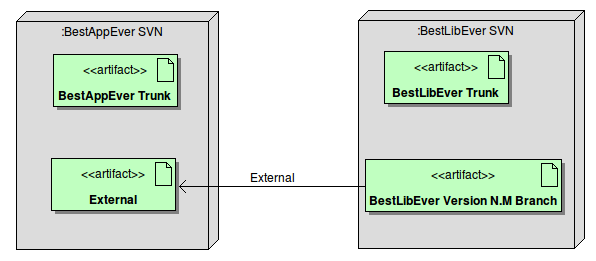
Again, although I said svn externals, most version control systems have their own externals version. For a detailed explanation on how externals work you should read the link above, for the moment let's just say this is enough to setup the external:

$ svn pe svn:externals .
# This will open your default editor. Now write this:
LibName           LibURL

Now every time you run an svn update, it will fetch the latest version of BestLibEver. We have a problem though: BestLibEver may be a project with a lot of commits, and the head revision may be very unstable. Not only it may crash (being a development version, it wouldn't be a strange thing) but also its interfaces may be constantly changing. And we certainly don't want to spend all day just changing our wrappers to make the project compile again.

There is a solution for this, and we don't have to go back to the first method of just copying the trunk to our repository: we can ask the maintainer of BestLibEver to just create a branch (or a tag, for this case it's pretty much the same) for a stable version and then use an external to that branch. Like this:

Now the team developing BestLibEver can work without complaints from their users and BestAppEver can have a stable svn, with controlled lib upgrades whenever they want.

Tuesday, 22 November 2011

Fixing some annoying GTK Warnings

So, new Buguntu upgrade, new problems. The usual deal. I don't like Unity so I installed the usual gnome desktop. Now when I start gVim I get a bunch of errors like this:

(gvim:7189): Gtk-WARNING **: Unable to locate theme engine in module_path: "pixmap"

OK, not errors, just warnings. I don't like them anyway, so I did this to fix it:

sudo apt-get install gtk2-engines-pixbuf
Now it works. One problem less, NaN to go... time to move back to Debian?